 Midnight Outpost
· Midnight Outpost Team · Devlog · 3 min read
Devlog #2 — The Workshop and Crafting System
Crafting in Midnight Outpost no longer happens in a grid. It happens at the Workshop — a building you construct, upgrade, and protect. Here is why we made that change and how the system works.
Early in development, crafting worked the way it works in most survival games: a 3×3 grid where you arrange ingredients in a specific pattern to produce an output. It was functional. It was familiar. And it was wrong for this game.
The problem was not the mechanic itself — it was what it implied. A portable crafting grid makes the player self-sufficient everywhere. It removes friction. It breaks the loop we are building, where the Outpost should be the hub of everything important: the place you return to, invest in, and defend because it holds real value.
So we cut the grid. Crafting now happens at the Workshop.
The Workshop
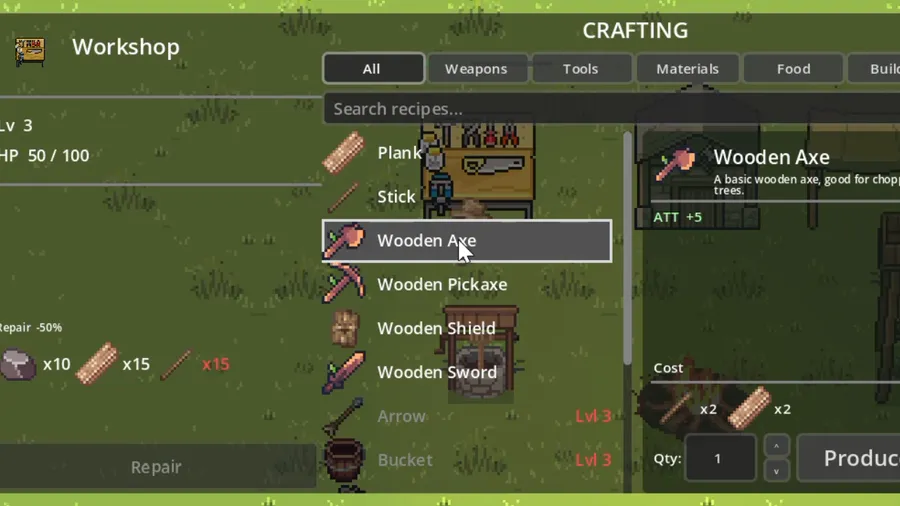
The Workshop is a building you construct at the Outpost using wood and stone. Once placed, it opens a dedicated crafting interface: a list of available recipes on the left, and a detail panel on the right showing the selected item’s name, icon, description, and stats.
To craft something, you need the ingredients in your inventory or in the Outpost’s shared storage, and you need to be standing at the Workshop. That is intentional. It ties crafting to a physical space — a space that can be upgraded, that can be destroyed in a night attack, and that the whole team benefits from.
Crafting Stations
Not everything is crafted at the Workshop. We introduced a station system with three tiers:
- By hand — basic items that require no building, craftable anywhere
- Workshop — tools, weapons, and building materials requiring a constructed station
- Hall — advanced recipes that unlock at higher upgrade levels
This tiering creates a natural progression arc. Early game, you are limited to what you can make with your hands. Once the Workshop is up, your options expand significantly. The Hall unlocks the endgame recipe pool. Each tier represents an investment in the Outpost, which reinforces the core loop.
The Item Preview Panel
One small detail that made a big quality-of-life difference: the item preview block. Every item in the crafting interface — and in the inventory — now shows a consistent panel with the item’s icon, name, description, and stat bonuses (ATT, DEF) displayed in a readable format.
This sounds minor, but it eliminated a lot of confusion during playtesting. Hovering over a recipe now tells you exactly what you are making and what it does before you commit the materials.
The same preview component is reused across the Workshop and the inventory description panel, so there is a single source of truth for how item information is displayed.
Shared Storage
Co-op changes crafting in an important way. When multiple players are gathering, resources pool up quickly — but only if everyone has access to the same materials. We implemented a shared Warehouse building that acts as communal storage. When you open the Workshop, you see your personal inventory alongside the shared supply. Recipes can pull from both.
This creates interesting team dynamics. One player can gather wood while another crafts, without needing to manually hand off items. The Outpost starts to feel less like a building and more like a shared resource — something worth protecting.
What Is Next
With crafting and the Workshop in place, the next major system is combat: weapons, armor, and the stats that govern how fights play out. The zombie waves are getting more dangerous, and we need the tools to match.
Follow along on Discord and check back for Devlog #3.