 Midnight Outpost
· Midnight Outpost Team · Devlog · 5 min read
Devlog #4 — Going Isometric
We rebuilt the entire visual foundation of Midnight Outpost in isometric view. Here is what that actually meant — tile systems, y-sorting, building footprints, wall bitmasks, and why it was worth it.
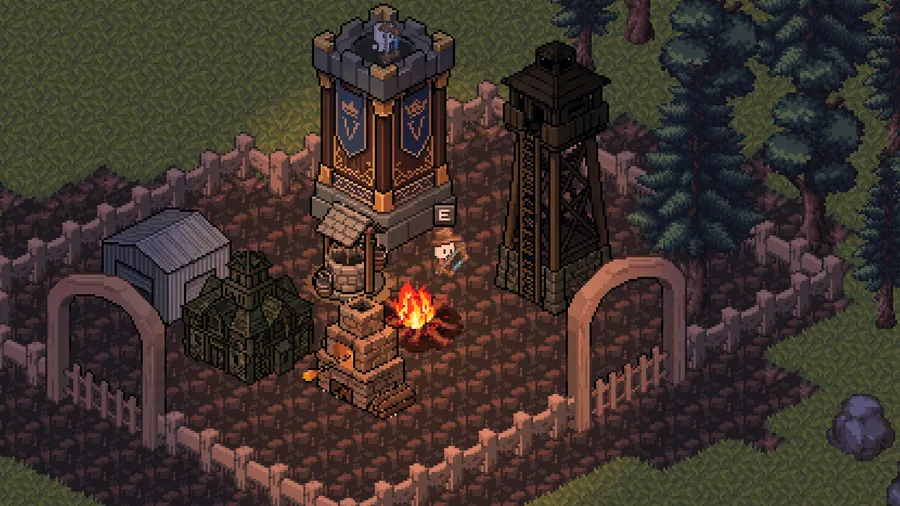
For most of its development, Midnight Outpost was a top-down game. Sprites were flat, movement was orthogonal, and depth was implied by layering. It worked. But when we started thinking seriously about the Outpost as a place — somewhere with buildings to construct, walls to defend, towers to man — the limitations became clear. The game needed depth that the camera could not fake.
So we went isometric.
This was not a cosmetic change. Switching to an isometric perspective touched every system in the game: tile rendering, collision, building placement, the wall and portal system, and the y-sort logic that determines what draws on top of what. This devlog covers how we handled that migration.
The Tile Foundation
Isometric tiles in Godot work differently from top-down tiles. Instead of a flat square grid, cells are rendered as diamonds — 32 pixels wide and 16 pixels tall. Each tile is drawn from a 32×32 sprite atlas with the diamond occupying the upper half, allowing sprites to extend below their logical boundary without affecting neighbors.
The first challenge was the coordinate system. In an isometric grid, moving one tile “north-east” and then one tile “south-west” does not return you to the start — at least not in screen space. We had to remap every tile-to-world and world-to-tile conversion in the codebase. The OutpostZone node became the single source of truth for these conversions, and every system that touched spatial coordinates — the build system, the wall manager, the spawn system — was updated to go through it.
Y-Sort and Rendering Order
Isometric games live and die by rendering order. When a building sits “in front of” a tree, it needs to draw on top of it. When a player walks behind a building, they need to disappear behind it. Godot’s y-sort handles this by ordering children of a node by their Y position: lower Y draws first, higher Y draws on top.
The rule sounds simple. In practice, it means every building, prop, and character needs to have its origin at the right point — specifically, at the “south” anchor of its sprite, the bottommost visible pixel. We set sprite offsets so that each node’s position matches this anchor, and enabled y-sort on the main scene. From that point, rendering order became automatic.
The exception is walls. Wall segments sit at ground level and need to render below buildings that overlap them. We solved this by giving walls a y-offset of -12 pixels — just enough to push them behind adjacent structures in the sort order without visually moving them.
Building Footprints and Colliders
Every building in Midnight Outpost occupies a footprint — a number of grid tiles it claims during placement. In top-down, a 2×2 footprint was a 2×2 square. In isometric, the same footprint is a diamond-shaped parallelogram in screen space.
We replaced the old rectangular collision shapes on buildings with CollisionPolygon2D nodes using hand-tuned isometric diamond polygons. Each level of each building has its own polygon stored in a level_collider_polygons export array, so the footprint accurately reflects the visual at every upgrade tier.
The build system was updated to place buildings at the south corner of their footprint — the tile that sits closest to the camera — and position the sprite so it extends upward and to the sides from that anchor. Rotating a building (pressing R in build mode) swaps the footprint dimensions and recalculates the placement anchor accordingly.
The Wall Bitmask System
Walls were the most complex part of the migration. A wall segment’s sprite depends on what neighbors it has: a straight horizontal wall looks different from a corner, a dead end, or a crossing. We handle this with a bitmask — four bits, one for each cardinal direction (NE, SW, NW, SE) — that maps to one of sixteen possible sprite configurations.
In isometric, those directions are visual. A wall running along the NW–SE axis looks like a horizontal line receding into the scene. A wall running NE–SW reads as a line coming toward the camera. Corners, T-junctions, and dead ends each have a unique sprite for each isometric orientation.
We rebuilt the wall segment scene from scratch with ten named sprite nodes — one per distinct visual configuration. The bitmask calculation runs whenever a wall is placed or removed, queries the four neighboring tiles, and shows only the matching sprite. Portals count as wall neighbors for bitmask purposes, so a wall segment adjacent to a portal blends naturally into it without special-casing the sprite logic.
The Portal
The portal presented its own challenge. Unlike wall segments, which are uniform in all directions, a portal has a clear orientation: it spans one axis (say, NW–SE) and opens on the other (NE–SW). A player walks through it; walls connect to its sides.
We implemented this as a flip system. A portal placed in its default orientation runs along one axis; pressing the flip key mirrors it horizontally to run along the other. Three sprite layers — back, center, and front — are drawn at different z-depths so the arch correctly occludes characters walking through it from the far side while revealing them on the near side.
The placement system adds a horizontal pixel offset when placing the portal so it snaps to the correct visual position on the tile grid despite the asymmetry of isometric projection.
Where We Are
The Outpost now looks like the game we set out to make. Buildings have depth. Walls read as real structures. The camera angle puts you slightly above the action, looking into the scene rather than straight down at it — a posture that makes the night raids feel more threatening and the Outpost feel more worth defending.
The full building roster — Hall, Workshop, Warehouse, Watchtower, Well, Defense Tower, walls, and portals — has been migrated to isometric. The next phase is balance, enemy behavior tuning, and the systems that make the Outpost worth building in the first place.
Join the conversation on Discord and follow along as we close in on the first playable build.